现在,对于至少有八个可重定位字节的默认 hook,Interceptor 会尝试在 Linux 和 Android 上于 B 指令可达范围内为 trampoline 寻找一个 slice,使重定向只需一条 B 指令。暂停的线程随后会从未经改动的原始字节恢复,而补丁本身只需一次对齐写入。恢复重定向也只需一次写入。为了更频繁地提供这样的邻近 slice,当完整的七页批次无法放入目标附近的空闲空间时,代码分配器现在会用单页重试邻近分配。
Arm 架构参考手册仍指出:当另一个核心可能正在执行某条任意指令时,用分支替换它的行为不可预测。因此,这项改动只是缩小了竞态窗口,并未彻底消除它,但实践中效果非常明显。还有一个需要注意的取舍:原本会使用 16 字节重定向的 hook,现在会更快耗尽目标附近的空间;而对于只有一条指令长的函数,由于其他方案都放不下,这些空间是执行 hook 的唯一选择。非常感谢 Georgi!
Swift ApiResolver 昨天刚获得查找类型、协议及其遵循关系的能力,但此前只能在 Apple 平台工作。它会查找 libswiftCore.dylib,从 libsystem_malloc 借用 free(),并按 Mach-O 名称匹配元数据节,因此 Linux 上的每次查询都会以“unsupported Swift runtime”失败。
Håvard 修复了所有这些问题:解析器现在按平台确定 Swift 核心库和元数据节名称;没有 libsystem_malloc 时,从 C 运行时获取 free();还为每个实例分别保存名称还原器,因为 Linux 上的 dlclose() 会取消映射 libswiftCore,缓存的指针可能比它存活更久。他还让 Swift 测试真正运行在 Linux CI 上——此前它们一直被静默跳过——并将跳过正确报告为跳过,而不是通过。非常感谢 Håvard!
constencodable=resolver.enumerateMatches('conformances:*!Swift.Encodable');console.log(encodable.length,'types conform to Encodable');for (const{name,address}ofencodable.slice(0,3))console.log(name,address);
3735 types conform to Encodable
UIIntelligenceSupport.IntelligenceElement.Axis!Swift.Encodable 0x2a5e0a1c8
UIIntelligenceSupport.IntelligenceElement.Image!Swift.Encodable 0x2a5e0a9d0
UIIntelligenceSupport.IntelligenceElement.CustomAppEntity!Swift.Encodable 0x2a5e0b0e8
从遵循关系描述符可以找到 witness table,从上下文描述符则可找到类型的元数据、字段和方法。因此,它们是任何希望在运行时理解 Swift 程序类型的工具的基础构件,从美化输出某个值,到 Hook 实现特定协议的每个类型。未来会有更多功能构建在其上。
#pragma abi native
structPlayer{u32health;u32lives;Rolerole;Vec3position;Player*next;};structVec3{floatx;floaty;floatz;};enumRole:u8{Warrior,Mage,Rogue,};
如果你写过 C 结构体,就已经知道该如何阅读它。唯一显眼的是
#pragma abi native,稍后我们会回到这一点。
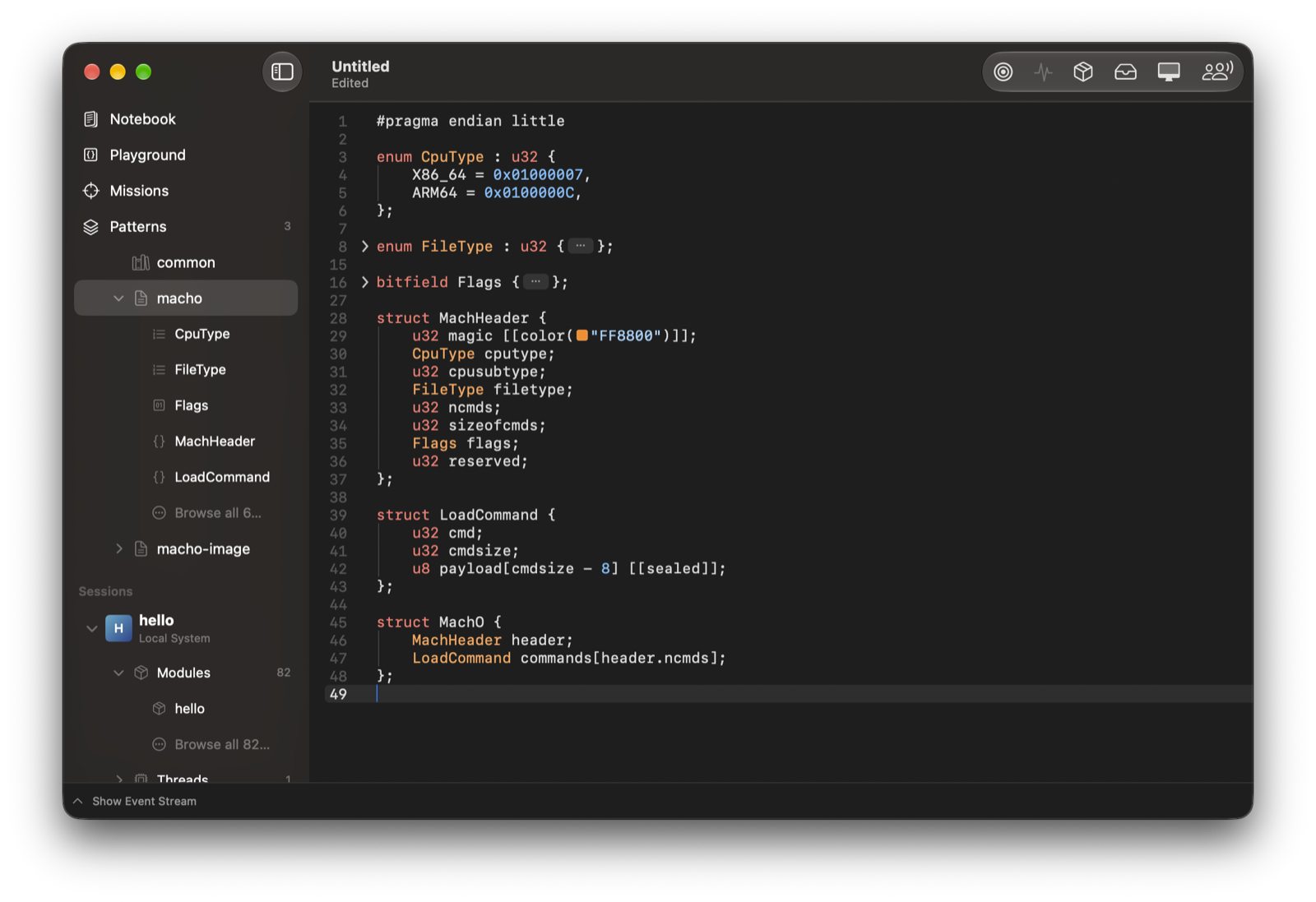
#pragma endian little
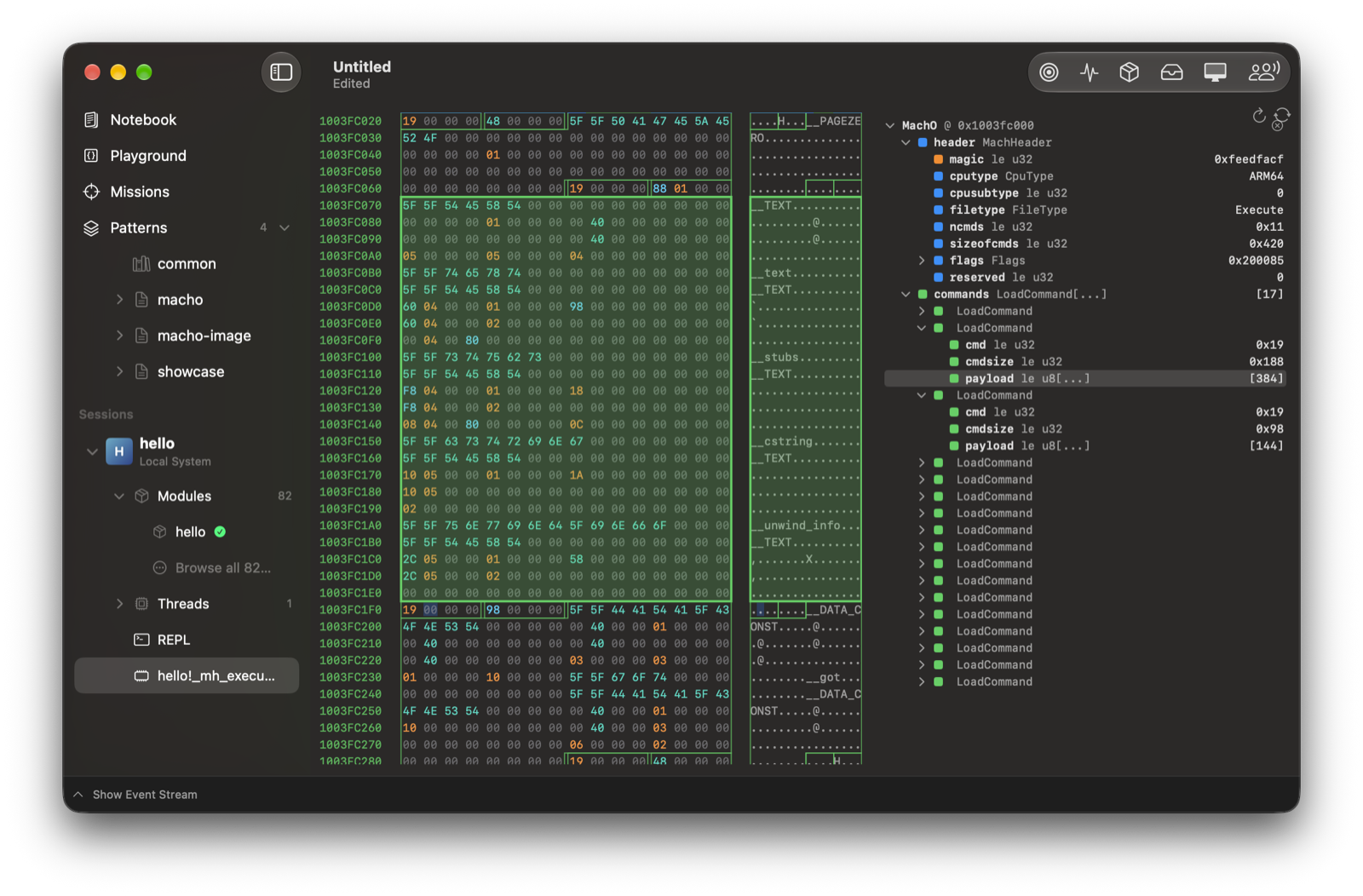
structMachO{MachHeaderheader;LoadCommandcommands[header.ncmds];};structMachHeader{u32magic[[color("FF8800")]];CpuTypecputype;u32cpusubtype;FileTypefiletype;u32ncmds;u32sizeofcmds;u32flags;u32reserved;};structLoadCommand{u32cmd;u32cmdsize;u8payload[cmdsize-8][[sealed]];};enumCpuType:u32{X86_64=0x01000007,ARM64=0x0100000C,};enumFileType:u32{Object=1,Execute=2,Dylib=6,};MachOmacho@0x00;
线程友好——api: Support invocation from any thread 允许从非主线程安全调用。(感谢 @hsorbo 参与结对编程。)
纯 Swift 核心与跨平台支持——核心绑定现已不依赖 Foundation 和 Dispatch,并使用纯 Swift 类型(二进制数据表示为 [UInt8])。目前仍有两个小缺口:Marshal 辅助函数中的 JSON 编解码当前使用 Foundation;以后会添加不依赖 Foundation 的后备实现。
importFridaimportSwiftUIstructDevicesView:View{@StateObjectprivatevarmodel=DeviceListModel(manager:DeviceManager())@StateprivatevarselectedDevice:Device?@Stateprivatevarsession:Session?varbody:someView{NavigationStack{List(model.devices,id:\.id){deviceinButton{Task{selectedDevice=devicesession=try?awaitdevice.attach(to:12345)}}label:{VStack(alignment:.leading){Text(device.name).font(.headline)Text(device.kind.rawValue).font(.subheadline).foregroundStyle(.secondary)}}}.navigationTitle("Frida Devices").overlay{ifmodel.devices.isEmpty{ProgressView("Searching for devices…")}}}}}
$ python install.py
PackageInstallResult(packages=[<2 packages>])[Package(name="frida-java-bridge", version="7.0.4", description="Java runtime interop from Frida"),
Package(name="frida-il2cpp-bridge", version="0.12.0", description="A Frida module to dump, trace or hijack any Il2Cpp application at runtime, without needing the global-metadata.dat file.")]$
letmatches=[];functionscan(pattern){constlocations=newSet();for (constrofProcess.enumerateMallocRanges()){for (constmatchofMemory.scanSync(r.base,r.size,pattern)){locations.add(match.address.toString());}}matches=Array.from(locations).map(ptr);console.log('Found',matches.length,'matches');}functionreduce(val){matches=matches.filter(location=>location.readU32()===val);console.log('Filtered down to:');console.log(JSON.stringify(matches));}functionpatternFromU32(val){returnnewMatchPattern(ptr(val).toMatchPattern().substr(0,11));}
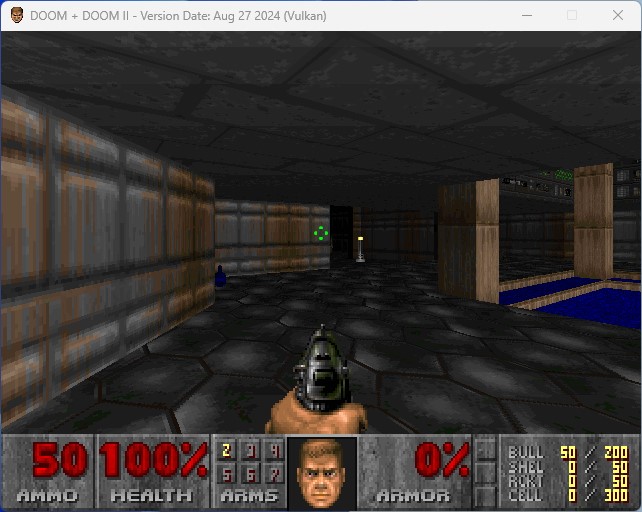
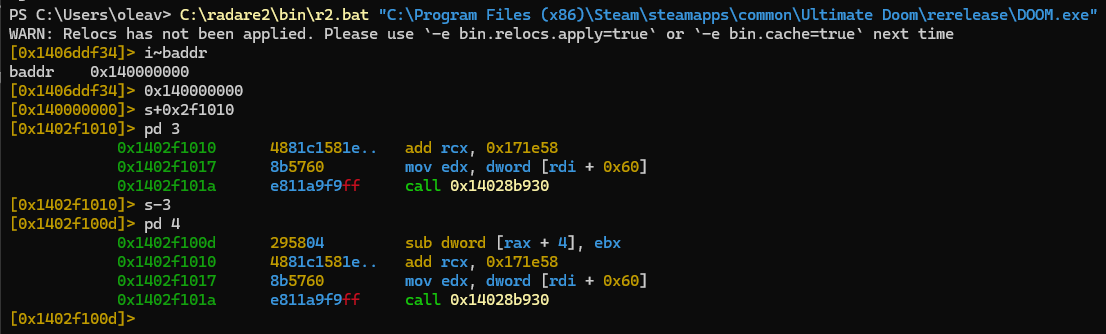
Interceptor.attach(Module.getBaseAddress('doom.exe').add(0x2f1010),function (){constammoLeft=this.context.rax.add(4).readU32();console.log(`Shots fired! Ammo left: ${ammoLeft}`);});
[Local::doom.exe ]-> Shots fired! Ammo left: 42
Shots fired! Ammo left: 41
Shots fired! Ammo left: 40
Shots fired! Ammo left: 39
Shots fired! Ammo left: 38
同样可以轻松制作无限弹药作弊功能:
Interceptor.attach(Module.getBaseAddress('doom.exe').add(0x2f100d),function (){this.context.rbx=ptr(0);console.log(`Shots fired! Pretending no ammo was actually used`);});
[Local::doom.exe ]-> Shots fired! Pretending no ammo was actually used
Shots fired! Pretending no ammo was actually used
Shots fired! Pretending no ammo was actually used
Shots fired! Pretending no ammo was actually used
Shots fired! Pretending no ammo was actually used
接下来是 Windows 端。我们做了一些调查,很快意识到 Apple 软件目前并不建立隧道。
官方驱动似乎也会一直占用 USB 设备,这意味着我们无法轻松触发模式切换并自行处理。
Windows 这块拼图可能存在一个优雅的解法,但我们意识到自己已经在这个兔子洞里钻得太深,
最明智的做法是留到以后再解决。所以,如果有读者愿意帮忙,请与我们联系。
我之所以选择为 Windows 维护独立的构建系统,是因为以前与不少经验丰富的 Windows 开发者合作过,并注意到如果能使用他们喜爱的 IDE,他们会对开源项目兴趣大增。对他们而言,重要的是能在调试器中查看崩溃,跳到属于开源库的栈帧,添加一些临时日志代码,然后按下“Run”快捷键,让 IDE 增量编译并重新链接一切,形成简短畅快的反馈循环。
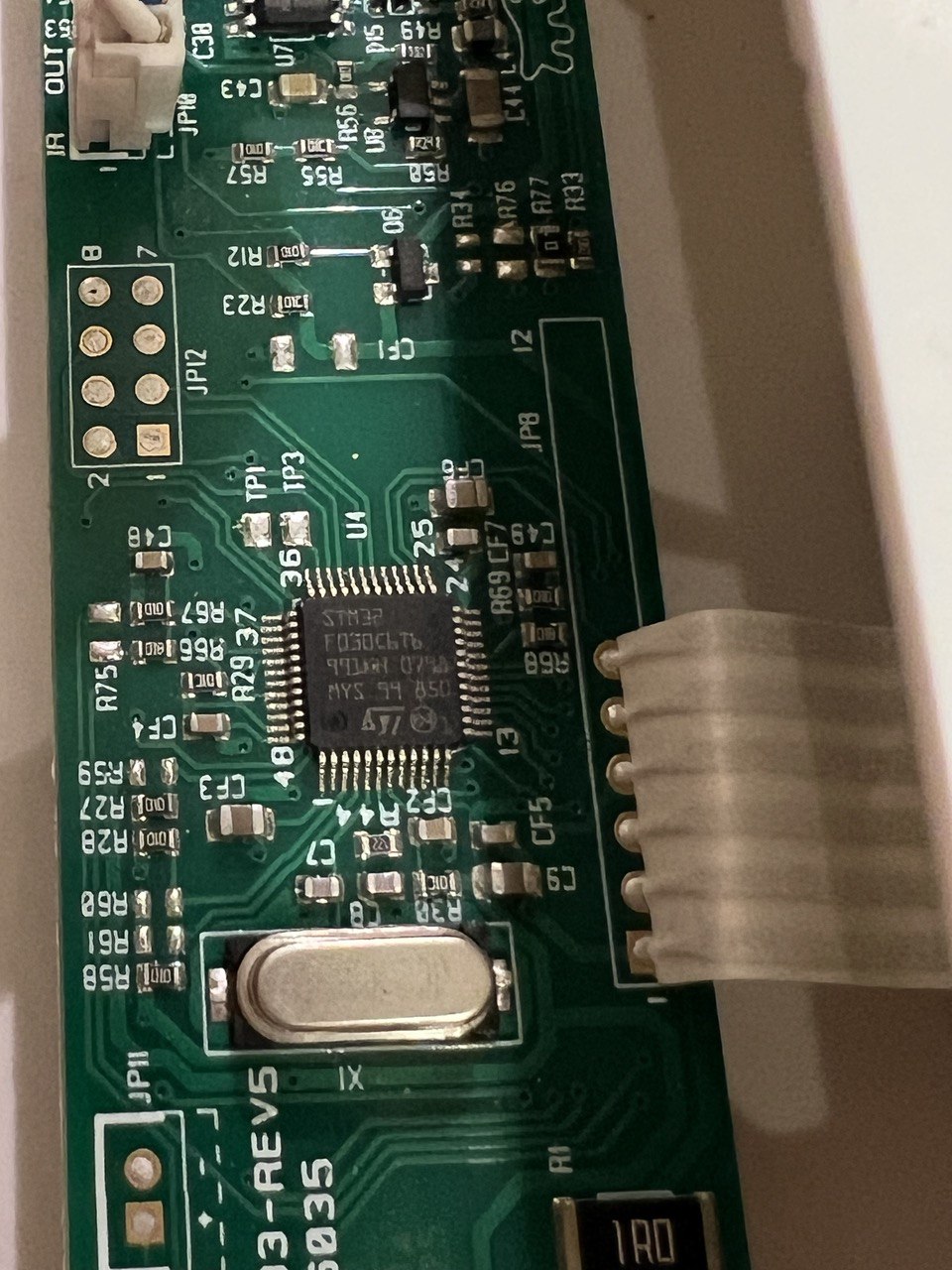
$ openocd -f interface/cmsis-dap.cfg -f target/stm32f0x.cfg
Open On-Chip Debugger 0.11.0-g8e3c38f7-dirty (2023-05-05-14:25)
Licensed under GNU GPL v2
For bug reports, read
	http://openocd.org/doc/doxygen/bugs.html
Info : auto-selecting first available session transport "swd". To override use 'transport select <transport>'.
Info : Listening on port 6666 for tcl connections
Info : Listening on port 4444 for telnet connections
Info : Using CMSIS-DAPv2 interface with VID:PID=0x2e8a:0x000c, serial=E6614103E78B482F
Info : CMSIS-DAP: SWD  Supported
Info : CMSIS-DAP: FW Version = 2.0.0
Info : CMSIS-DAP: Interface Initialised (SWD)
Info : SWCLK/TCK = 0 SWDIO/TMS = 0 TDI = 0 TDO = 0 nTRST = 0 nRESET = 0
Info : CMSIS-DAP: Interface ready
Info : clock speed 1000 kHz
Info : SWD DPIDR 0x0bb11477
Info : stm32f0x.cpu: hardware has 4 breakpoints, 2 watchpoints
Info : starting gdb server for stm32f0x.cpu on 3333
Info : Listening on port 3333 for gdb connections
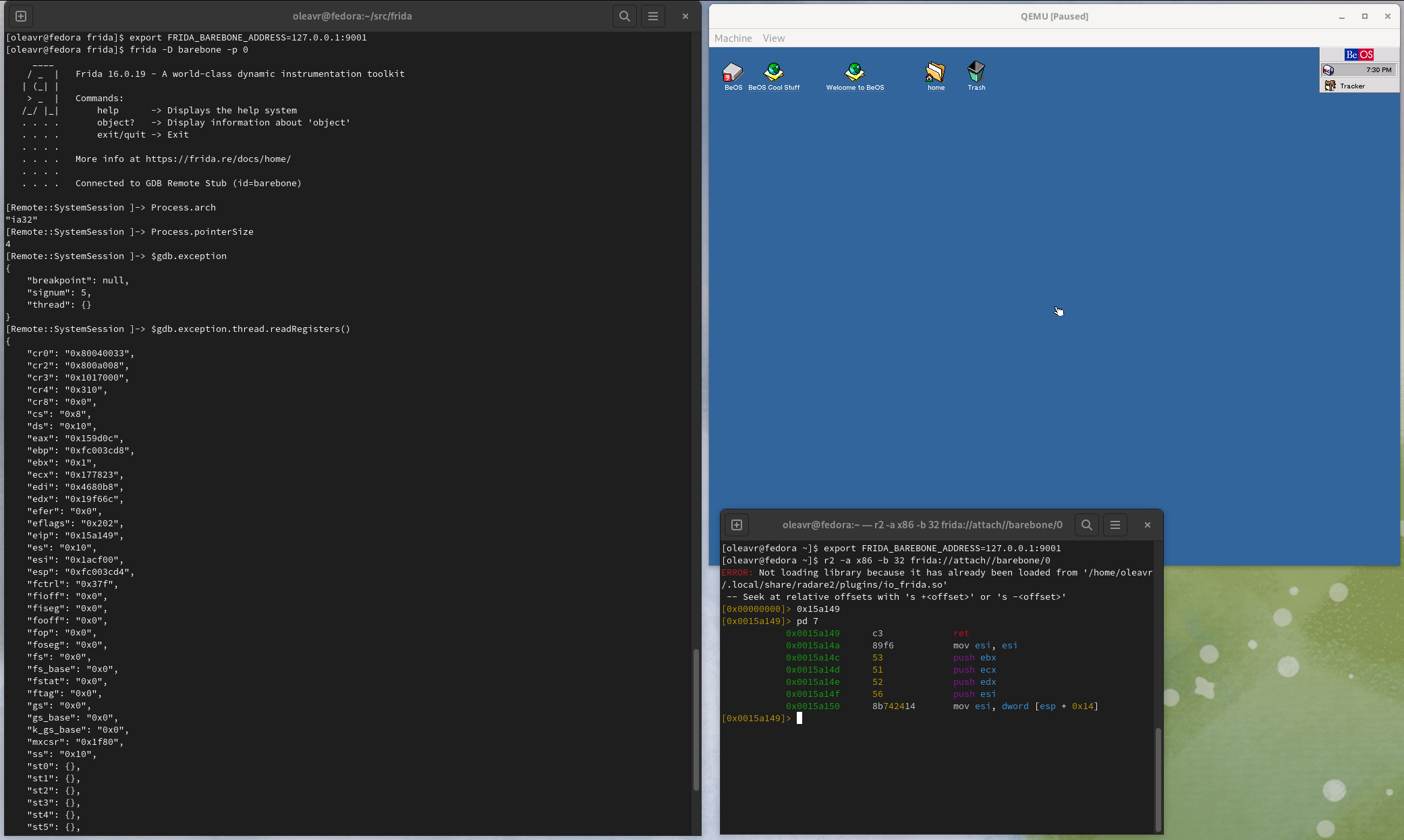
$ frida -D barebone -p 0 -l kernhook2.js
____
/ _ | Frida 16.1.0 - A world-class dynamic instrumentation toolkit
| (_| |
> _ | Commands:
/_/ |_| help -> Displays the help system
.... object? -> Display information about 'object'....exit/quit -> Exit
........ More info at https://frida.re/docs/home/
........ Connected to GDB Remote Stub (id=barebone)
Error: to enable this feature, set FRIDA_BAREBONE_HEAP_BASE to the physical base address to use, e.g. 0x48000000
at <eval>(/home/oleavr/src/demo/kernhook2.js:13)
at evaluate (native)
at <anonymous> (/frida/repl-2.js:1)[Remote::SystemSession ]->
# head -3 /proc/self/status
Name: head
Umask: 0022
State: R (running)# head -3 /proc/self/status
Name: head
Umask: 0022
State: R (running)# head -3 /proc/self/status
Name: head
Umask: 0022
State: R (running)
回到 REPL,应该能看到 hook() 被命中三次:
proc_pid_status() was called with x0=0xffffffc00d4bca00 x1=0xffffff8008608758
proc_pid_status() was called with x0=0xffffffc00d4bc780 x1=0xffffff8008608758
proc_pid_status() was called with x0=0xffffffc00d4bc780 x1=0xffffff8008608758
on_diagnostics: [{'category': 'error', 'code': 6053,
'text': "File '/home/oleavr/src/agent.ts' not ""found.\n The file is in the program ""because:\n Root file specified for"" compilation"}]
…
$ frida -p 0 -l _agent.js
____
/ _ | Frida 15.2.0 - A world-class dynamic instrumentation toolkit
| (_| |
> _ | Commands:
/_/ |_| help -> Displays the help system
.... object? -> Display information about 'object'....exit/quit -> Exit
........ More info at https://frida.re/docs/home/
........ Connected to Local System (id=local)
Attaching...
Hello 15.2.0!
[Local::SystemSession ]->
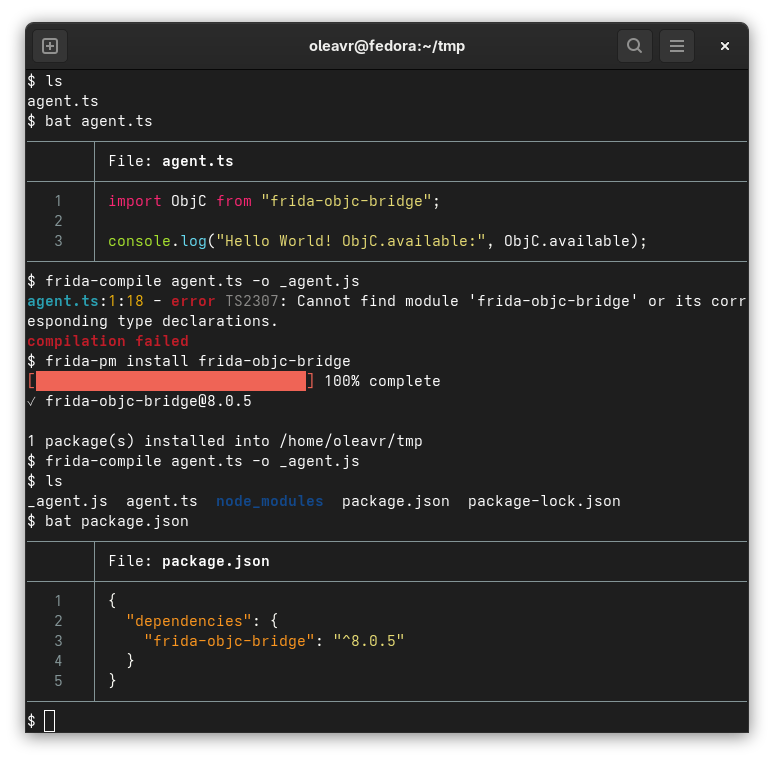
成功了!现在重构一下,把代码拆分为两个文件:
agent.ts
import{log}from"./log.js";log("Hello from Frida:",Frida.version);
📦
204 /agent.js.map
72 /agent.js
199 /log.js.map
58 /log.js
✄
{"version":3,"file":"agent.js","sourceRoot":"/home/oleavr/src/","sources":["agent.ts"],"names":[],"mappings":"AAAA,OAAO,EAAE,GAAG,EAAE,MAAM,UAAU,CAAC;AAE/B,GAAG,CAAC,mBAAmB,EAAE,KAAK,CAAC,OAAO,CAAC,CAAC"}
✄
import { log } from "./log.js";

log("Hello from Frida:", Frida.version);
✄
{"version":3,"file":"log.js","sourceRoot":"/home/oleavr/src/","sources":["log.ts"],"names":[],"mappings":"AAAA,MAAM,UAAU,GAAG,CAAC,GAAG,IAAW;IAC9B,OAAO,CAAC,GAAG,CAAC,GAAG,IAAI,CAAC,CAAC;AACzB,CAAC"}
✄
export function log(...args){
console.log(...args);}
把它加载到 REPL 中,应得到与之前完全相同的结果。
watch()
把这个玩具编译器变成一个工具:它加载编译后的脚本,并在磁盘上的源文件发生变化时重新编译:
importfridaimportsyssession=frida.attach(0)script=Nonedefon_output(bundle):globalscriptifscriptisnotNone:print("Unloading old bundle...")script.unload()script=Noneprint("Loading bundle...")script=session.create_script(bundle)script.on("message",on_message)script.load()defon_diagnostics(diag):print("on_diagnostics:",diag)defon_message(message,data):print("on_message:",message)compiler=frida.Compiler()compiler.on("output",on_output)compiler.on("diagnostics",on_diagnostics)compiler.watch("agent.ts")sys.stdin.read()
开始运行:
$ python3 explore.py
Loading bundle...
Hello from Frida: 15.2.0
让它持续运行,再编辑磁盘上的源代码,应看到一些新输出:
Unloading old bundle...
Loading bundle...
Hello from Frida version: 15.2.0
太棒了!
frida-compile
还可以使用 frida-tools 新增的 frida-compile CLI 工具:
$ frida-compile agent.ts -o _agent.js
它也支持监视模式:
$ frida-compile agent.ts -o _agent.js -w
REPL
REPL 也由新的 frida.Compiler 提供支持:
$ frida -p 0 -l agent.ts
____
/ _ | Frida 15.2.0 - A world-class dynamic instrumentation toolkit
| (_| |
> _ | Commands:
/_/ |_| help -> Displays the help system
.... object? -> Display information about 'object'....exit/quit -> Exit
........ More info at https://frida.re/docs/home/
........ Connected to Local System (id=local)
Compiled agent.ts (1428 ms)
Hello from Frida version: 15.2.0
[Local::SystemSession ]->
隆重介绍_全新的_ Swift 桥接!Swift 从版本 5 起已实现 ABI 稳定,这个期待已久的桥接让 Frida 能够很好地配合 Swift 编写的二进制文件。无论你认为 Swift 是静态语言还是动态语言,有一点可以确定:随着这个 Frida 版本发布,它变得动态多了。
元数据
逆向工程师开始分析二进制文件时,通常首先要了解其中定义的各种数据结构。因此,最合理的起点是构建与 ObjC.classes 和 ObjC.protocols API 对应的 Swift 能力。不过 Swift 还有结构体、枚举等一等类型,而且 Swift 运行时并未提供 Objective-C 意义上的反射原语,所以我们必须挖得更深一些。
如果通过 API 实例化 PortalService,事情就有趣得多,因为这样可以轻松接入自定义的
身份验证后端:
importfridadefauthenticate(token):# Where `token` might be an OAuth access token
# that is used to grab user details from e.g.
# GitHub, Twitter, etc.
user=…# Attach some application-specific state to the connection.
return{'name':user.name,}cluster_params=frida.EndpointParameters(authentication=('token',"wow-such-secret"))control_params=frida.EndpointParameters(authentication=('callback',authenticate))service=frida.PortalService(cluster_params,control_params)
asyncfunctionstart(){constws=wrapEventStream(newWebSocket(`ws://${location.host}/ws`));constbus=dbus.peerBus(ws,{authMethods:[],});consthostSessionObj=awaitbus.getProxyObject('re.frida.HostSession15','/re/frida/HostSession');consthostSession=hostSessionObj.getInterface('re.frida.HostSession15');constprocesses:HostProcessInfo[]=awaithostSession.enumerateProcesses({});console.log('Got processes:',processes);consttarget=processes.find(([,name])=>name==='hello2');if (target===undefined){thrownewError('Target process not found');}const[pid]=target;console.log('Got PID:',pid);constsessionId=awaithostSession.attach(pid,{'persist-timeout':newVariant('u',30)});…}
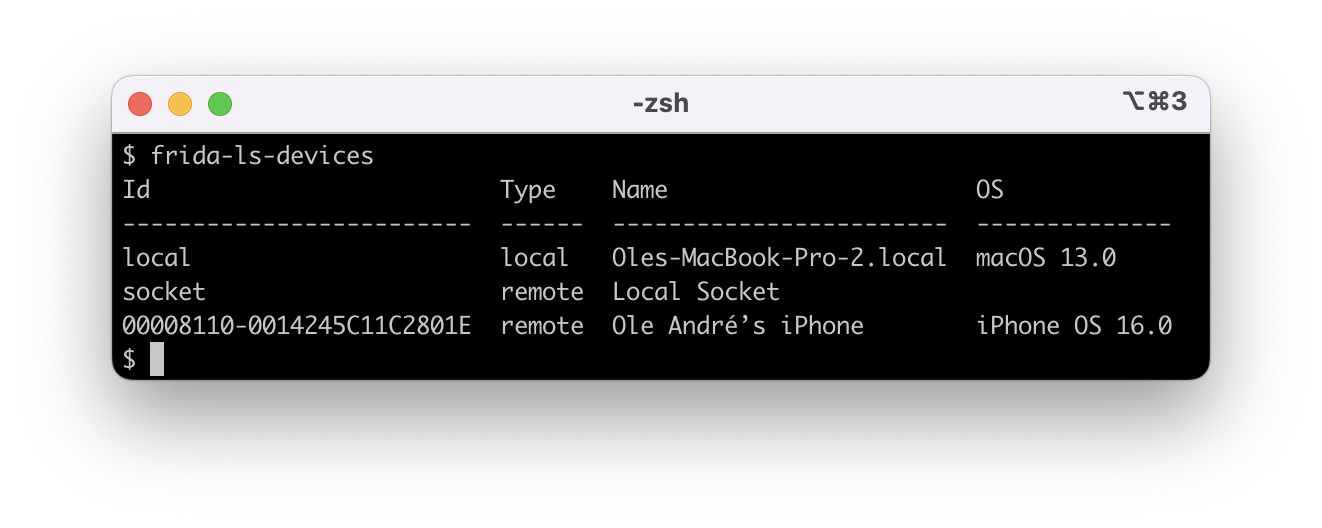
只有两个需要注意的陷阱。如果联网的 iOS 设备既能通过网络访问,又同时插着线,那么现在
可能会出现两个 ID 相同的不同 Device 对象。
例如:
$ frida-ls-devices
Id Type Name
--------------------------------------------------------------------local local Local System
00008027-xxxxxxxxxxxxxxxx usb iPad
socket remote Local Socket
00008027-xxxxxxxxxxxxxxxx remote iOS Device [fe80::146f:75af:d79:630c]
因此,如果使用 -U 或 frida.get_usb_device(),行为会与以前一样,通过 USB 使用
设备。但如果想使用联网设备,按 ID 解析时 USB 条目会优先,因为它在设备列表中通常位于
联网设备之前。
再进一步,CModule API 现在还提供 CModule.builtins 属性,脚手架工具可以用它取得内置头文件和预处理器定义。
说到这里,frida-tools 中现在已经有了这样的工具:
$ mkdir pewpew
$ cd pewpew
$ frida-create cmodule
Created ./meson.build
Created ./pewpew.c
Created ./.gitignore
Created ./include/glib.h
Created ./include/gum/gumstalker.h
Created ./include/gum/gumprocess.h
Created ./include/gum/gummetalarray.h
Created ./include/gum/guminterceptor.h
Created ./include/gum/gumspinlock.h
Created ./include/gum/gummetalhash.h
Created ./include/gum/gummemory.h
Created ./include/gum/gumdefs.h
Created ./include/gum/gummodulemap.h
Created ./include/json-glib/json-glib.h
Created ./include/gum/arch-x86/gumx86writer.h
Created ./include/capstone.h
Created ./include/x86.h
Created ./include/platform.h
Run `meson build && ninja -C build` to build, then:
- Inject CModule using the REPL: frida Calculator -C ./build/pewpew.dylib
- Edit *.c, and build incrementally through `ninja -C build`
- REPL will live-reload whenever ./build/pewpew.dylib changes on disk
$ meson build && ninja -C build
…
[2/2] Linking target pewpew.dylib
$ frida Calculator -C ./build/pewpew.dylib
…
init()[Local::Calculator]->
$ frida-trace \-U\-f com.google.android.youtube \--runtime=v8 \-j'*!*certificate*/isu'
Instrumenting...
X509Util.addTestRootCertificate: Auto-generated handler at "/Users/oleavr/__handlers__/org.chromium.net.X509Util/addTestRootCertificate.js"
X509Util.clearTestRootCertificates: Auto-generated handler at "/Users/oleavr/__handlers__/org.chromium.net.X509Util/clearTestRootCertificates.js"
X509Util.createCertificateFromBytes: Auto-generated handler at "/Users/oleavr/__handlers__/org.chromium.net.X509Util/createCertificateFromBytes.js"
X509Util.isKnownRoot: Auto-generated handler at "/Users/oleavr/__handlers__/org.chromium.net.X509Util/isKnownRoot.js"
X509Util.verifyKeyUsage: Auto-generated handler at "/Users/oleavr/__handlers__/org.chromium.net.X509Util/verifyKeyUsage.js"
X509Util.verifyServerCertificates: Auto-generated handler at "/Users/oleavr/__handlers__/org.chromium.net.X509Util/verifyServerCertificates.js"
ResourceLoader$CppProxy.native_enableDevCertificate: Auto-generated handler at "/Users/oleavr/__handlers__/com.google.android.libraries.elements.interfaces.ResourceLoader_CppProxy/native_enableDevCertificate.js"
ResourceLoader$CppProxy.enableDevCertificate: Auto-generated handler at "/Users/oleavr/__handlers__/com.google.android.libraries.elements.interfaces.ResourceLoader_CppProxy/enableDevCertificate.js"
AndroidCertVerifyResult.getCertificateChainEncoded: Auto-generated handler at "/Users/oleavr/__handlers__/org.chromium.net.AndroidCertVerifyResult/getCertificateChainEncoded.js"
bjbm.a: Auto-generated handler at "/Users/oleavr/__handlers__/bjbm/a.js"
bjbn.a: Auto-generated handler at "/Users/oleavr/__handlers__/bjbn/a.js"
AndroidNetworkLibrary.addTestRootCertificate: Auto-generated handler at "/Users/oleavr/__handlers__/org.chromium.net.AndroidNetworkLibrary/addTestRootCertificate.js"
AndroidNetworkLibrary.clearTestRootCertificates: Auto-generated handler at "/Users/oleavr/__handlers__/org.chromium.net.AndroidNetworkLibrary/clearTestRootCertificates.js"
AndroidNetworkLibrary.verifyServerCertificates: Auto-generated handler at "/Users/oleavr/__handlers__/org.chromium.net.AndroidNetworkLibrary/verifyServerCertificates.js"
vxr.checkClientTrusted: Auto-generated handler at "/Users/oleavr/__handlers__/vxr/checkClientTrusted.js"
vxr.checkServerTrusted: Auto-generated handler at "/Users/oleavr/__handlers__/vxr/checkServerTrusted.js"
vxr.getAcceptedIssuers: Auto-generated handler at "/Users/oleavr/__handlers__/vxr/getAcceptedIssuers.js"
ResourceLoader.enableDevCertificate: Auto-generated handler at "/Users/oleavr/__handlers__/com.google.android.libraries.elements.interfaces.ResourceLoader/enableDevCertificate.js"
Started tracing 18 functions. Press Ctrl+C to stop.
/* TID 0x339d */
955 ms AndroidNetworkLibrary.verifyServerCertificates([[48,-126,9,…],[48,-126,4,…]], "RSA", "suggestqueries.google.com")
972 ms AndroidCertVerifyResult.getCertificateChainEncoded()
1043 ms AndroidNetworkLibrary.verifyServerCertificates([[48,-126,4,…],[48,-126,4,…]], "RSA", "www.googleadservices.com")
1059 ms AndroidCertVerifyResult.getCertificateChainEncoded()
/* TID 0x33a0 */
1643 ms AndroidNetworkLibrary.verifyServerCertificates([[48,-126,5,…],[48,-126,4,…]], "RSA", "googleads.g.doubleclick.net")
/* TID 0x339d */
1651 ms AndroidNetworkLibrary.verifyServerCertificates([[48,-126,9,…],[48,-126,4,…]], "RSA", "www.youtube.com")
/* TID 0x33a1 */
1665 ms AndroidNetworkLibrary.verifyServerCertificates([[48,-126,15,…],[48,-126,4,…]], "RSA", "lh3.googleusercontent.com")
/* TID 0x33a0 */
1674 ms AndroidCertVerifyResult.getCertificateChainEncoded()
/* TID 0x339d */
1674 ms AndroidCertVerifyResult.getCertificateChainEncoded()
/* TID 0x3417 */
1674 ms AndroidNetworkLibrary.verifyServerCertificates([[48,-126,15,…],[48,-126,4,…]], "RSA", "yt3.ggpht.com")
/* TID 0x33a1 */
1684 ms AndroidCertVerifyResult.getCertificateChainEncoded()
/* TID 0x3417 */
1688 ms AndroidCertVerifyResult.getCertificateChainEncoded()
2513 ms AndroidNetworkLibrary.verifyServerCertificates([[48,-126,9,…],[48,-126,4,…]], "RSA", "redirector.googlevideo.com")
2527 ms AndroidCertVerifyResult.getCertificateChainEncoded()
2722 ms AndroidNetworkLibrary.verifyServerCertificates([[48,-126,9,…],[48,-126,4,…]], "RSA", "r1---sn-bxuovgf5t-vnaz.googlevideo.com")
/* TID 0x33a1 */
2741 ms AndroidNetworkLibrary.verifyServerCertificates([[48,-126,9,…],[48,-126,4,…]], "RSA", "r2---sn-bxuovgf5t-vnas.googlevideo.com")
/* TID 0x339d */
2758 ms AndroidNetworkLibrary.verifyServerCertificates([[48,-126,9,…],[48,-126,4,…]], "RSA", "r2---sn-bxuovgf5t-vnaz.googlevideo.com")
/* TID 0x33a1 */
2771 ms AndroidCertVerifyResult.getCertificateChainEncoded()
/* TID 0x3417 */
2772 ms AndroidCertVerifyResult.getCertificateChainEncoded()
/* TID 0x339d */
2777 ms AndroidCertVerifyResult.getCertificateChainEncoded()
2892 ms AndroidNetworkLibrary.verifyServerCertificates([[48,-126,6,…],[48,-126,4,…]], "RSA", "r2---sn-bxuovgf5t-vnas.googlevideo.com")
/* TID 0x3417 */
2908 ms AndroidNetworkLibrary.verifyServerCertificates([[48,-126,6,…],[48,-126,4,…]], "RSA", "r2---sn-bxuovgf5t-vnaz.googlevideo.com")
/* TID 0x33a1 */
2926 ms AndroidNetworkLibrary.verifyServerCertificates([[48,-126,6,…],[48,-126,4,…]], "RSA", "r1---sn-bxuovgf5t-vnaz.googlevideo.com")
/* TID 0x3417 */
2935 ms AndroidCertVerifyResult.getCertificateChainEncoded()
/* TID 0x339d */
2937 ms AndroidCertVerifyResult.getCertificateChainEncoded()
/* TID 0x33a1 */
2942 ms AndroidCertVerifyResult.getCertificateChainEncoded()
其中有一项修复尤其值得单独说明。Android Java 集成中长期存在一个错误:传递异常时,进程偶尔会崩溃,堆栈跟踪中通常会出现 GetOatQuickMethodHeader()。感谢 Jake Van Dyke 和 Giovanni Rocca 协助追踪这个问题。自从 Frida 支持 ART 以来,这个错误就一直存在,因此这项修复值得庆祝。🎉
Frida 自身需要生成和转换大量机器码,例如实现 Interceptor 和 Stalker,所以我们
早已有 C API 来处理六种不同的指令集也不足为奇。最初这些 API 太过基础,我认为向
JavaScript 公开它们没有太大价值;但经过多年有趣的内部使用场景,它们已经演进到可以
很好覆盖关键功能的程度。
constgetLivesLeft=Module.getExportByName('game-engine.so','get_lives_left');constmaxPatchSize=64;// Do not write out of bounds, may be// a temporary buffer!Memory.patchCode(getLivesLeft,maxPatchSize,code=>{constcw=newX86Writer(code,{pc:getLivesLeft});cw.putMovRegU32('eax',9999);cw.putRet();cw.flush();});
{"name":"hello-frida","version":"1.0.0","scripts":{"prepublish":"npm run build","build":"frida-compile agent -o _agent.js","watch":"frida-compile agent -o _agent.js -w"},"devDependencies":{"express":"^4.14.0","frida-compile":"^2.0.6"}}
然后把以下代码粘贴到 agent.js:
constexpress=require('express');constapp=express();app.get('/ranges',(req,res)=>{res.json(Process.enumerateRangesSync({protection:'---',coalesce:true}));}).get('/modules',(req,res)=>{res.json(Process.enumerateModulesSync());}).get('/modules/:name',(req,res)=>{try{res.json(Process.getModuleByName(req.params.name));}catch (e){res.status(404).send(e.message);}}).get('/modules/:name/exports',(req,res)=>{res.json(Module.enumerateExportsSync(req.params.name));}).get('/modules/:name/imports',(req,res)=>{res.json(Module.enumerateImportsSync(req.params.name));}).get('/objc/classes',(req,res)=>{if (ObjC.available){res.json(Object.keys(ObjC.classes));}else{res.status(404).send('Objective-C runtime not available in this process');}}).get('/threads',(req,res)=>{res.json(Process.enumerateThreadsSync());});app.listen(1337);
constopen=newSystemFunction(Module.getExportByName(null,'open'),'int',['pointer','int']);constO_RDONLY=0;constpath=Memory.allocUtf8String('/inexistent');constresult=open(path,O_RDONLY);console.log(JSON.stringify(result,null,2));/*
* Which on Darwin typically results in the following output:
*
* {
* "value": -1,
* "errno": 2
* }
*
* Where 2 is ENOENT.
*/
本版本还允许从传给 Interceptor.replace() 的 NativeCallback 中读取和修改系统错误值,这在替换系统 API 时很有用。请注意,使用 Interceptor.attach() 原本就能这样做,但如果不希望调用原始函数,它就不适用。
另一项值得一提的重要变化是 V8 运行时经过了大幅重构。代码现在更容易理解,添加新功能所需的工作也少得多。不仅如此,参数解析现在还由单一代码路径处理。因此所有 API 对错误或缺失参数都更稳健:忘记参数时会得到 JavaScript 异常,而不是因为某些 API 检查较少而直接让目标进程崩溃。
constMyConnectionDelegateProxy=ObjC.registerClass({name:'MyConnectionDelegateProxy',super:ObjC.classes.NSObject,protocols:[ObjC.protocols.NSURLConnectionDataDelegate],methods:{'- init':function (){constself=this.super.init();if (self!==null){ObjC.bind(self,{foo:1234});}returnself;},'- dealloc':function (){ObjC.unbind(this.self);this.super.dealloc();},'- connection:didReceiveResponse:':function (conn,resp){/* this.data.foo === 1234 */},/*
* But those previous methods are declared assuming that
* either the super-class or a protocol we conform to has
* the same method so we can grab its type information.
* However, if that's not the case, you would write it
* like this:
*/'- connection:didReceiveResponse:':{retType:'void',argTypes:['object','object'],implementation(conn,resp){}},/* Or grab it from an existing class: */'- connection:didReceiveResponse:':{types:ObjC.classes.Foo['- connection:didReceiveResponse:'].types,implementation(conn,resp){}},/* Or from an existing protocol: */'- connection:didReceiveResponse:':{types:ObjC.protocols.NSURLConnectionDataDelegate.methods['- connection:didReceiveResponse:'].types,implementation(conn,resp){}},/* Or write the signature by hand if you really want to: */'- connection:didReceiveResponse:':{types:'v32@0:8@16@24',implementation(conn,resp){}}}});constproxy=MyConnectionDelegateProxy.alloc().init();/* use `proxy`, and later: */proxy.release();
$ frida Calculator -l calc.js
_____
(_____)
| | Frida 4.0.0 - A world-class dynamic
| | instrumentation framework
|`-'|
| | Commands:
| | help -> Displays the help system
| | object? -> Display information about 'object'
| | exit/quit -> Exit
| |
| | More info at https://frida.re/docs/home/
`._.'# The code in calc.js has now been loaded and executed[Local::ProcName::Calculator]->
# Reload it from file at any time[Local::ProcName::Calculator]-> %reload
[Local::ProcName::Calculator]->
# Connect Frida to a locally-running Calculator.app# and load calc.js with the debugger enabled$ frida Calculator -l calc.js --debug
_____
(_____)
| | Frida 4.0.0 - A world-class dynamic
| | instrumentation framework
|`-'|
| | Commands:
| | help -> Displays the help system
| | object? -> Display information about 'object'
| | exit/quit -> Exit
| |
| | More info at https://frida.re/docs/home/
`._.'
Debugger listening on port 5858
# We can now run node-inspector and start debugging calc.js[Local::ProcName::Calculator]->
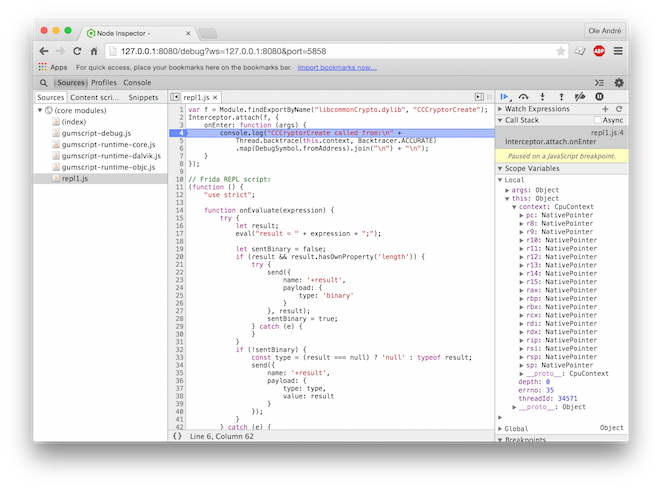
constf=Module.getExportByName('libcommonCrypto.dylib','CCCryptorCreate');Interceptor.attach(f,{onEnter(args){console.log('CCCryptorCreate called from:\n'+Thread.backtrace(this.context,Backtracer.ACCURATE).map(DebugSymbol.fromAddress).join('\n')+'\n');}});
又或者,你正在 Windows 上尝试找出谁访问了某些内存区域?那就看看全新的
MemoryAccessMonitor。严格来说,这段代码
并不是新的,只是直到现在才向 JavaScript API 公开。
Mac 和 iOS 注入器会手动映射 Frida 的 dylib。这意味着我们可以附加到受到严格沙箱限制的进程。
frida-trace、frida-repl 等 CLI 工具现在全新支持启动进程:
$ frida-trace -i'open*'-i'read*' /bin/cat /etc/resolv.conf
27 ms open$NOCANCEL()
28 ms read$NOCANCEL()
28 ms read$NOCANCEL()
28 ms read$NOCANCEL()
Target process terminated.
Stopping...
$
想在 Windows 或 Linux 上启动进程,而不只是 Mac?或者你遇到过 Linux 注入器
让进程崩溃,而不是让你成功注入?又或者,某个函数名太长,导致 frida-trace
在 Windows 上超出最大文件名长度?好吧,无论上述情况你遇到了全部、一部分,还是一个都没有,
Frida 1.4.1 都是为你准备的!
感谢 Guillaume 和 Pedro 让此版本变得如此出色。欢迎继续提交 pull request 和错误报告!
constUIAlertView=ObjC.use('UIAlertView');/* iOS */ObjC.schedule(ObjC.mainQueue,()=>{constview=UIAlertView.alloc().initWithTitle_message_delegate_cancelButtonTitle_otherButtonTitles_("Frida","Hello from Frida",ptr("0"),"OK",ptr("0"));view.show();view.release();});
Module.enumerateExports() 现在不仅枚举导出函数,也会枚举导出变量。
onMatch 回调会收到一个 exp 对象,其 type 字段为 function
或 variable。

 oleavr


 hot3eed

 mrmacete
 karltk